
Nuxt 4 vs Nuxt 3: Key Differences Compared
See what's new in Nuxt 4, the Nuxt 4 features that matter, the Nuxt 4 breaking changes that catch teams out, and where Nuxt 3 stands now.
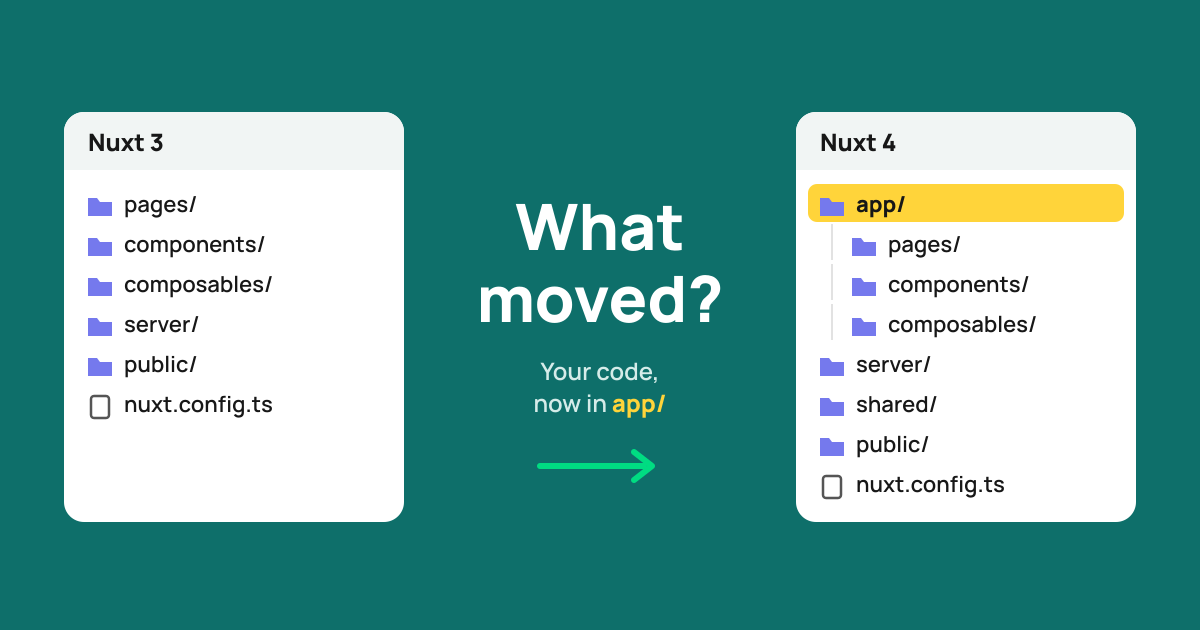
Nuxt 4 came out in July 2025, and Nuxt 3 reached end of life a year later. If you still run Nuxt 3, or you're starting a project and want to know what changed, this post covers the differences, the breaking changes that catch teams out, and whether to move now.
Nuxt 4 vs Nuxt 3 Differences: The Short Answer
Nuxt 4 vs Nuxt 3 differences come down to defaults. It's the same Vue, the same Nitro server and the same rendering modes. It moves your code into an app/ directory, makes data fetching share state by key, splits TypeScript into separate projects and speeds up the dev tooling. If you're new to the framework itself, start with What is Nuxt.
| Nuxt 3 | Nuxt 4 | |
|---|---|---|
| Source directory | Project root | app/ (old layout still detected) |
useFetch / useAsyncData | Each call has its own state | Same key shares data, error and status |
Default data and error | null | undefined |
data reactivity | Deep ref | shallowRef |
| TypeScript | One project | Separate app, server, shared and node projects |
| Server engine | Nitro v2 | Nitro v2 |
| Support | End of life since July 31, 2026 | Current major |
What's New in Nuxt 4: Key Nuxt 4 Features
What's new in Nuxt 4 is mostly structure and data fetching. These are the Nuxt 4 features you'll notice first.
The app/ Directory
Your pages, components, layouts, composables and plugins now live in app/, and ~ points there. server/, shared/, public/, layers/, modules/ and nuxt.config.ts stay at the root. The point is to keep your code apart from node_modules/ and .git/, which the Nuxt team says makes file watching faster. Nuxt 4 still detects the Nuxt 3 layout, so moving is optional.
Singleton Data Fetching
Calls to useAsyncData or useFetch with the same key now share their data, error and status. Two components that fetch cart read the same state instead of keeping two copies. Data is cleaned up when the components using it unmount, and a reactive key refetches when it changes. The catch: calls that share a key must not use conflicting options.
Separate TypeScript Projects
Nuxt now generates separate TypeScript projects for app code, server code, shared/ and build-time code, and you keep a single tsconfig.json at the root. App code no longer sees server-only types, and the reverse. Project references are opt-in, so this doesn't force a migration.
Faster CLI and Dev Server
The 4.0 release lists four changes. The dev server starts noticeably faster, Nuxt reuses the V8 compile cache, and file watching uses fs.watch for fewer system resources. The CLI also talks to the Vite dev server over internal sockets instead of network ports. The Nuxt team didn't publish startup numbers.
Nuxt 4 Breaking Changes
Nuxt 4 brought few breaking changes overall, but the data fetching ones catch teams out. The ones to check first:
dataanderrornow default toundefined, so code that checksdata.value === nullstops working.datais ashallowRef. Mutating a nested field no longer triggers an update: replace the value, or passdeep: truefor that call.- Two calls with the same key now read the same refs, so their options must not conflict.
pendingfollowsstatus. Withimmediate: falseit staysfalseuntil the first request starts.dedupe: trueandfalseare gone. Use'cancel'or'defer'.- Head management moves to Unhead v2, which drops
hid,vmidandchildren. - The top-level
generateconfig is gone. Prerender options live undernitro.prerender.
TypeScript also gets stricter: noUncheckedIndexedAccess is on by default, so array and record lookups can now be undefined. Most of these changes have a flag that restores the old behavior. The full list is in the official upgrade guide.
Nuxt 3 End of Life and Nuxt 5
Nuxt 3 was due to lose support at the end of January 2026. The team extended that, and Nuxt 3 reached end of life on July 31, 2026. It no longer gets bug fixes or security patches. Nuxt 5 isn't out yet: the official roadmap estimates Q4 2026 and lists Nitro v3 as the main change. Nuxt 4 stays supported for six months after Nuxt 5 ships.
Should You Move to Nuxt 4?
Yes. Nuxt 3 gets no more security fixes, and Nuxt 4 is the version Nuxt 5 will upgrade from. The size of the job depends on how much data fetching code relies on null checks and nested mutation. Our Nuxt 4 migration guide covers the upgrade, and our Nuxt migration services team can take it on.
Conclusion
Nuxt 4 tidies up Nuxt 3. The app/ folder and split TypeScript are easy wins, and the data fetching changes are where upgrades break. As an official Nuxt partner, we can help you plan the move.
FAQs
Is Nuxt 4 backward compatible with Nuxt 3?
Mostly. The Nuxt team calls 4.0 a stability-focused release with a few deliberate breaking changes, and most of them have a config flag that restores the Nuxt 3 behavior. Most projects upgrade with little code change, but data fetching code needs a review.
Is Nuxt 3 still supported?
No. Nuxt 3 reached end of life on July 31, 2026, and no longer gets bug fixes or security patches from the Nuxt team. Some vendors sell paid security support for it, but the supported path is Nuxt 4.
Is Nuxt 4 faster than Nuxt 3?
In development, yes: the Nuxt team reports a faster dev server start, lighter file watching and a faster CLI. They make no runtime speed claim for Nuxt 4 itself, since both versions run on Nitro v2 and Vue 3.5. The shallow data refs can save reactivity work on large payloads.
Do I have to use the app/ directory in Nuxt 4?
No. Nuxt 4 auto-detects the Nuxt 3 folder layout, so an upgraded project keeps working without moving files. New projects start with app/, and moving to it is a one-time change you can make later.
What happens to Nuxt 4 when Nuxt 5 ships?
Nuxt 4 stays supported for 6 months after Nuxt 5 is released, according to the official roadmap. Nuxt 5 is estimated for Q4 2026 and brings Nitro v3. Nuxt 4.2 and later can already test Nuxt 5 behavior with future.compatibilityVersion: 5.
Vue.js is our passion. Open Source is our culture 😍