
Nuxt Rendering Explained: SSR, SSG, SPA and Hybrid Modes
See how Nuxt.js SSR works, when Nuxt SSG fits better, how route rules mix modes per page, and how to pick the right one for speed and SEO.
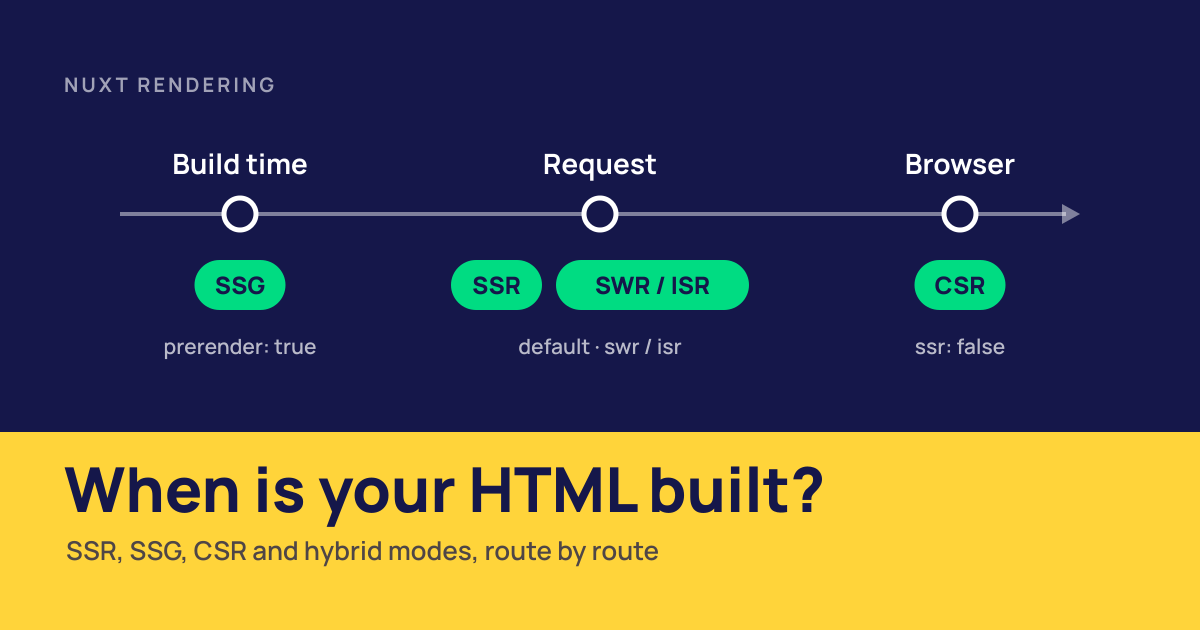
Nuxt rendering decides where your Vue components become HTML: on a server for each request, once at build time, or in the visitor's browser. Nuxt supports all three, and it lets each route pick its own. This guide explains how Nuxt SSR, SSG, client-side rendering and hybrid rendering work, what edge rendering and server components add, and how to choose a mode for each kind of page.
Nuxt Rendering Modes at a Glance
| Mode | Where HTML is built | When | Best for | Needs a server? |
|---|---|---|---|---|
| SSR (universal) | Server | Every request | Pages with fresh or per-user data | Yes |
| SSG (prerender) | Build machine | At build time | Marketing pages, blogs, docs | No |
CSR (ssr: false) | Browser | After JavaScript loads | Dashboards and apps behind a login | No |
| SWR / ISR | Server, then cache | First request, then on expiry | Catalogs and listings that change hourly | Yes, or a platform that supports it |
| Hybrid | Mixed per route | Set in routeRules | Most real apps | For the non-static routes |
Nuxt rendering starts from one default: universal rendering, which Nuxt calls SSR. The server renders the page, sends HTML, and the browser hydrates it into a working Vue app. After that first load, navigation happens in the browser like a single-page app.
Everything else is a variation on where and when that first HTML is produced. SSG moves rendering to build time. CSR skips the server and lets the browser do it. SWR and ISR render on the server but cache the result. Hybrid rendering mixes these per route.
This article stays on how each mode works in Nuxt. (New to Nuxt itself? Start with what Nuxt is.)
How Nuxt.js SSR Works
In a Nuxt.js app, SSR is on by default, so every route is rendered on the server unless you change it. Three things happen on each request: the server renders HTML, the browser hydrates it, and data loaded on the server travels with the page so it isn't fetched twice. For the general SSR vs CSR vs SSG background, outside Nuxt, see our post on Vue.js rendering and SEO.
Server-Rendered HTML and Hydration
When a request arrives, Nuxt runs your page, layout and components on the server and returns the HTML. The browser shows that content right away, before any JavaScript has run. Then the same Vue code runs again in the browser and attaches event listeners to the existing HTML instead of rebuilding it. That second step is hydration.
Code in <script setup> runs in both places. A ref is created on the server to render the template, and again in the browser during hydration. A click handler only ever runs in the browser. Pages and route middleware run on the server and again during hydration. Plugins can be marked server-only or client-only with a .server or .client suffix.
Data Fetching During SSR
useFetch and useAsyncData run during server rendering and store their result in the page payload, a serialized copy of the data embedded in the HTML. During hydration, Nuxt reads the payload instead of calling the API again.
<script setup lang="ts">
const route = useRoute()
const { data: product } = await useFetch(`/api/products/${route.params.id}`)
</script>
A plain fetch inside onMounted does the opposite: nothing on the server, so the HTML arrives without that data. For shared state, use useState rather than a module-level ref, because module state on the server is shared between requests.
Hydration Mismatches and How to Avoid Them
A hydration mismatch happens when the HTML the browser builds doesn't match what the server sent. Vue warns in the console, and parts of the page can render wrong. The usual causes:
- Values that differ between server and browser:
Date.now(),Math.random(), time zones and locale formatting - Browser-only state read during render, such as
localStorageorwindow.innerWidth - Invalid HTML nesting, like a
<div>inside a<p>, which the browser silently rewrites
The fixes are simple once you know them. Read browser-only values in onMounted, or wrap the component in <ClientOnly>. Use useState or useId for values that must match on both sides. Check import.meta.client before touching window in shared code. In development, Vue logs each mismatch with the element involved, so most are caught long before production.
Nuxt SSG: Prerendering Pages at Build Time
Nuxt SSG, or prerendering, does the server rendering once, at build time. Run nuxt generate and Nuxt builds the app, starts it, and crawls it: it renders / and every page in app/pages/ without dynamic segments, follows each internal link it finds, and saves every page as an HTML file with a _payload.json next to it. The result in .output/public can be uploaded to any static host or CDN.
To visitors and crawlers, a prerendered page looks exactly like an SSR page: full HTML, then hydration. The difference is when the HTML is made. There's no rendering work per request, so pages are fast and cheap to serve, and there's no server to scale or keep patched.
This website works that way. Every page of epicmax.co is prerendered with nuxt generate, including this article, and served as static files. A new post is a Markdown file; merging it triggers a rebuild and a redeploy.
Three things to plan for:
- Pages nothing links to won't be found by the crawler. Add them to the prerender routes list in
nuxt.config.ts, or make sure a sitemap or index page links to them. - Content only changes when you rebuild. That's fine for blogs and marketing pages, which usually redeploy on every edit. For data that changes every few minutes, a full rebuild is too slow, and SWR or ISR is the better fit.
- A static build has no server, so
server/apiroutes don't exist in production. Forms and dynamic data have to go to an external API or serverless function.
You can also prerender only part of a server-rendered app with prerender: true in route rules: static marketing pages, server-rendered everything else.
Client-Side Rendering in Nuxt
Set ssr: false and Nuxt behaves like a classic Vue single-page app. The server, or static host, sends an empty HTML shell, and the browser downloads the JavaScript and renders the page. You can show a loading screen in the meantime with app/spa-loading-template.html.
Client-side rendering is simpler to write: no server environment, so window and localStorage are always available, and there's no hydration to get wrong. It's cheap to host, since a static file server is enough. Nuxt still gives you file-based routing, auto-imports, modules and the rest of the developer experience.
The trade-off is the first load. Nothing appears until the JavaScript has downloaded, parsed and run, and crawlers that don't execute JavaScript see an empty page. That makes CSR a good fit for dashboards, admin panels and tools that users open often and that search engines never need to see. In a client-rendered app, bundle size is the main lever on load time, so code splitting and lazy components matter more. Our guide to Vue.js performance optimization covers how to measure and trim it.
Hybrid Rendering With Route Rules
Most apps don't fit one mode. A store needs a fast static homepage, product pages that stay fresh and an account area that doesn't need SSR at all. Route rules let one Nuxt app do all three:
export default defineNuxtConfig({
  routeRules: {
    '/': { prerender: true },
    '/blog/**': { isr: true },
    '/products/**': { swr: 3600 },
    '/account/**': { ssr: false },
  },
})
Per-Route SSR, Prerendering and Client-Only Pages
prerender: true builds the route at build time, ssr: false makes it client-only, and routes without a rule use the default SSR. The same config also handles redirect, headers and cors, so rendering and response settings live in one place. Because some routes still render on the server, a hybrid app is deployed with nuxt build, not nuxt generate.
Patterns are matched against the URL, and /** covers everything under a path, so one line can set the mode for a whole section. In the example above, a visitor who lands on the homepage gets a static file, clicks through to a product page that was rendered and cached on the server, then signs in to an account area that renders in the browser. They never notice the switch. After the first page, Nuxt navigates client-side in all three cases.
Rules can also be set from a page with defineRouteRules, behind the experimental inlineRouteRules flag, which keeps the rendering choice next to the page it affects. Most teams keep them in nuxt.config.ts, where the whole map is visible at once.
ISR and SWR Caching
swr renders a page on the first request and caches it for the number of seconds you set. When the cache expires, the next visitor still gets the cached page while Nuxt regenerates it in the background. With swr: true, there's no fixed lifetime. Nitro's Node.js server can cache the full response itself.
isr works the same way, but stores the page in the hosting platform's CDN cache, which Nuxt supports on Netlify and Vercel. isr: true keeps the page cached until the next deploy. Both modes also write _payload.json files, so client-side navigation reuses the cached data.
SWR and ISR sit between SSR and SSG. Pages stay almost as fast as static files, because most requests hit the cache, but content updates without a rebuild. The price is that some visitors see a slightly old version until the background refresh finishes, so neither fits prices or stock levels that must be exact on every request.
Edge Rendering, Islands and Server Components
Two newer options change where rendering happens and how much JavaScript a page ships.
Edge-Side Rendering
Edge-side rendering runs your Nuxt server on a CDN's edge network, close to each visitor, instead of in one region. The Nuxt docs call it more a deployment target than a rendering mode: you build with a Nitro preset such as Cloudflare, vercel-edge or netlify-edge, and route rules work as usual. Edge runtimes support only part of the Node.js API, so check that your server dependencies run there.
Edge rendering cuts network latency, not rendering time. If every page waits on a database in one region, the edge server still has to reach it, and the gain shrinks. It pays off most when the data is cached or also distributed.
Nuxt Islands and Server Components
A server component, named with a .server.vue suffix, renders only on the server. Its HTML goes into the page, but its JavaScript and dependencies, such as a Markdown parser or syntax highlighter, are never sent to the browser. You can also render an island anywhere with <NuxtIsland>. Server components are still marked experimental, and the feature switches itself on as soon as your app contains one. Inside a server component, the nuxt-client attribute can hydrate a single interactive child while the rest stays static.
For components that do need JavaScript, lazy hydration delays the cost: <LazyComments hydrate-on-visible /> renders on the server but only hydrates when it scrolls into view. Other triggers include hydrate-on-idle, hydrate-on-interaction and a fixed delay with :hydrate-after.
Nuxt SSR Performance and SEO
Nuxt SSR helps most on the first visit. The browser gets readable HTML in the first response, so the main content can paint before any JavaScript runs. That usually improves Largest Contentful Paint compared with client-side rendering, especially on slow phones and networks.
It adds two costs. The first is server time: rendering per request raises Time to First Byte, and a slow API makes it worse because the server waits for data before sending anything. Caching with swr or isr, or prerendering, removes most of that work. The second is hydration: the browser still downloads and runs the JavaScript for every component on the page, which can delay interactivity and hurt Interaction to Next Paint on heavy pages. Lazy hydration and server components are the main tools there. If you want help measuring and fixing these, our frontend performance optimization service starts with a baseline from field data, lab tests and browser profiling.
For SEO, server-rendered and prerendered pages are the safe choice. Titles, meta descriptions, canonical tags and structured data set with useSeoMeta or useHead are in the HTML that crawlers fetch. Google can render JavaScript, but it does so in a later pass when it has capacity. Most AI crawlers don't render it at all, so a client-rendered page is close to invisible to them. Our guide on SEO for AI agents in Vue and Nuxt covers what those crawlers read.
Rendering mode also affects error pages. In a client-rendered app, the server answers every URL with the same shell and a 200 status, so a missing page looks real to a crawler. With Nuxt SSR, throwing createError({ status: 404 }) in a page sends a proper 404, and redirects set in route rules are real HTTP redirects.
How to Choose a Nuxt Rendering Mode
| Page type | Mode | Route rule |
|---|---|---|
| Homepage, landing and marketing pages | SSG | prerender: true |
| Blog posts and docs | SSG, or ISR if edits must go live without a rebuild | prerender: true or isr: true |
| Product and category pages | SWR or ISR | swr: 3600 or isr: 3600 |
| Search results, filters, personalized pages | SSR | (default) |
| Cart and checkout | SSR | (default) |
| Dashboard, account, admin | CSR | ssr: false |
Start with one question per route: does a crawler or a first-time visitor need the content in the HTML? If not, client-side rendering is the simplest option. If yes, ask how often the content changes. Content that changes with each edit can be prerendered. Content that changes hourly or daily fits SWR or ISR. Content that depends on the user or the request needs SSR.
Online stores show why per-route rules matter. A catalog with thousands of products is slow to prerender on every deploy, but product pages must be indexed and fast, so cached server rendering suits them. The cart and checkout depend on the user, and the account area needs no SEO at all. Our walkthrough of an e-commerce store with Medusa and Nuxt 4 shows the storefront side of that setup, from product pages to the cart.
If you're not sure, keep the default SSR and add rules where you have a reason. If you're coming from plain Vue, our comparison of Nuxt vs Vue explains when the server side is worth adding at all.
Conclusion
Nuxt doesn't make you pick one rendering mode for the whole app. SSR is the default, SSG prerenders what doesn't change, CSR handles private app screens, and SWR or ISR cache pages that change on a schedule. Route rules combine them in one config. Edge rendering, server components and lazy hydration are there for the pages where latency or JavaScript size is still the problem.
At Epicmax, we have built client projects with Nuxt since 2017. If you're planning a Nuxt app or need to fix rendering, speed or SEO in an existing one, our Nuxt development services can help.
FAQs
Does Nuxt use SSR by default?
Yes. Nuxt uses universal rendering out of the box: the ssr option is true, so every route is rendered to HTML on the server and then hydrated in the browser. You can switch it off globally with ssr: false or per route with route rules.
What is the difference between SSR and SSG in Nuxt?
Both send finished HTML to the browser. SSR renders a page on the server for each request, so it can show fresh or per-user data. SSG renders pages once at build time with nuxt generate, so they are served as static files until the next build.
Can I mix SSR and SSG in one Nuxt app?
Yes, that is what hybrid rendering is for. In routeRules you can prerender some routes, cache others with swr or isr, render others on every request and make some client-only. The app needs a server build (nuxt build) for anything that is not prerendered.
Is Nuxt SSR good for SEO?
Yes. Crawlers get the full content, title, meta tags and structured data in the first HTML response, without running JavaScript. That matters for Google, which renders JavaScript on a delay, and even more for AI crawlers, most of which don't render it at all. Our guide to Vue and SEO covers the rest of the checklist.
Does Nuxt SSR need a Node.js server?
It needs a JavaScript runtime that can render pages on request, but not necessarily a Node.js server you manage. Nitro builds the same app for Node.js, serverless functions on platforms like Vercel and Netlify, or edge runtimes like Cloudflare Workers. Only prerendered (SSG) output works with no runtime at all.
Can I host a Nuxt SSG site on static hosting?
Yes. nuxt generate writes HTML, JavaScript and payload files to .output/public, which you can upload to any static host or CDN. The one limit is that server routes don't exist in a static build, so API calls must go to a separate backend.
When should I turn off SSR in Nuxt?
Turn it off for pages nobody needs to find in search: dashboards, admin panels and account areas behind a login, or apps that rely heavily on browser-only APIs. Usually you do this per route with ssr: false in routeRules and keep SSR for public pages.
Vue.js is our passion. Open Source is our culture 😍